WordPress Download Manager Directory Add-on will help WordPress Download Manager users to show all categories and downloads on a single page with different styles.
WordPress Download Manager Directory Add-on Setup Instructions:
Install:
Upload/Install from Admin Menu Plugins Add New Upload, Just the same way as other WordPress plugins.
Usage:
[wpdm_archive button_style="default" template="link-template-default" cols=1 items_per_page="10" orderby="title" order="ASC" login=1 last_state=0]
[wpdm_archive_compact template="link-template-default" cols=2 colspad=1 colsphone=1 items_per_page="10" orderby="title" order="ASC" login=1]
[wpdm_archive_simple template="link-template-default" cols=2 colspad=1 colsphone=1 items_per_page="10" orderby="title" order="ASC" login=1]
[wpdm_archive_flat orderby="title" order="ASC"]
Use the shortcode inside page or post content to show directory like interface for WordPress Download Manager
Parameters:
— buton_style: `default` or `success` or `info` or `warning` or `danger` or `primary` or `secondary`
— template: any link-template ID( optional parameter )
— category: use any category slug here if you want to create an archive page for that specific category or don’t use the parameter
— include_children: if you use category parameter, on initial load, it only will fetch the packages from the mentioned categories, if you want to include packages from sub-categories too, you must use include_children=1.
— orderby: `package_size_b` or `date` or `modified` or `download_count` or `view_count` or `title`
— order: `asc` or `desc`
— order_fields: optional parameter, you can use this option if you want to edit order fields dropdown options. Ex: order_fields="date:Date|title:Title|modified:Last Updated"
— login: 1, use this parameter if you want to make the shortcode members only / login protected. Otherwise, you may skip this parameter.
[wpdm_categories] – Use the shortcode inside page or post content to show all categories
[wpdm_categories orderby="name" order="DESC" subcat="1" showcount="0" cols=3]
Parameters:
— orderby: how the retrieved terms should be sorted:
- name – Sorts terms alphabetically by name.
- slug – Sorts terms alphabetically by slug.
- term_id – Sorts terms numerically by term ID.
- id – Alias for term_id.
- count – Sorts terms by the number of posts associated with them (post count).
- description – Sorts terms alphabetically by description.
- parent – Sorts terms by their parent term ID
— order: ASC or DESC
— subcat: Show ( 1 ) or Hide ( 0 ) sub-categories
— subcat: Show ( 1 ) or Hide ( 0 ) sub-categories
— showcount: Show ( 1 ) or Hide ( 0 ) number of packages in a category
— cols: Number of columns
[wpdm_tags btnstyle="link" icon="tag" showcount=1 cols=3]
Parameters:
— showcount: Show ( 1 ) or Hide ( 0 ) number of packages in a category
— cols: Number of columns
— icon: Font awesome icon
— btnstyle: Button style, possible values: link | secondary | primary | success | info | warning | danger
[wpdm_category_blocks categories="slug1,slug2..." cols=4 button_color="green|blue|purple|primary|info|warning|danger|success|#colorcode" hover_color="primary-hover|info-hover|warning-hover|danger-hover|success-hover|#colorcode"]
Parameters:
— categories: Category slugs separated by comma
— cols: Number of columns, 1 or 2 or 3 or 4 or 6 or 12
— button_color: Block color scheme, use any of the pre-defined colors ( green, blue, purple, primary, info, warning, danger, success or color code like #339966
— hover_color: Block hove color, use any of the pre-defined colors ( green, blue, purple, primary-hover, info-hover, warning, danger-hover, success-hover or color code like #339966
Generates advanced search and filter page:
[wpdm_archive_filter items_per_page="12" template="link-template-default" cols=1 colspad=1 colsphone=1]
Parameters:
— template: any link-template ID ( optional parameter )
— category: use any category slug here if you want to create an archive page for that specific category or don’t use the parameter
— include_children: if you use category parameter, on initial load, it only will fetch the packages from the mentioned categories, if you want to include packages from sub-categories too, you must use include_children=1.
— orderby: `package_size_b` or `date` or `modified` or `download_count` or `view_count` or `title`
— order_fields: optional parameter, you can use this option if you want to edit order fields dropdown options. Ex: order_fields="date:Date|title:Title|modified:Last Updated"
— order: `asc` or `desc`
— login: 1, use this parameter if you want to make the shortcode members only / login protected. Otherwise, you may skip this parameter.
— cols: Number of columns, 1 or 2 or 3 or 4 or 6 or 12 ( optional parameter )
— colspad: Number of columns in tabs/pads, 1 or 2 or 3 or 4 or 6 or 12 ( optional parameter )
— colsphone: Number of columns in phone, 1 or 2 or 3 or 4 or 6 or 12 ( optional parameter )
— sidebar: left or right
additionally, there is a search box widget for searching downloads.
Note:
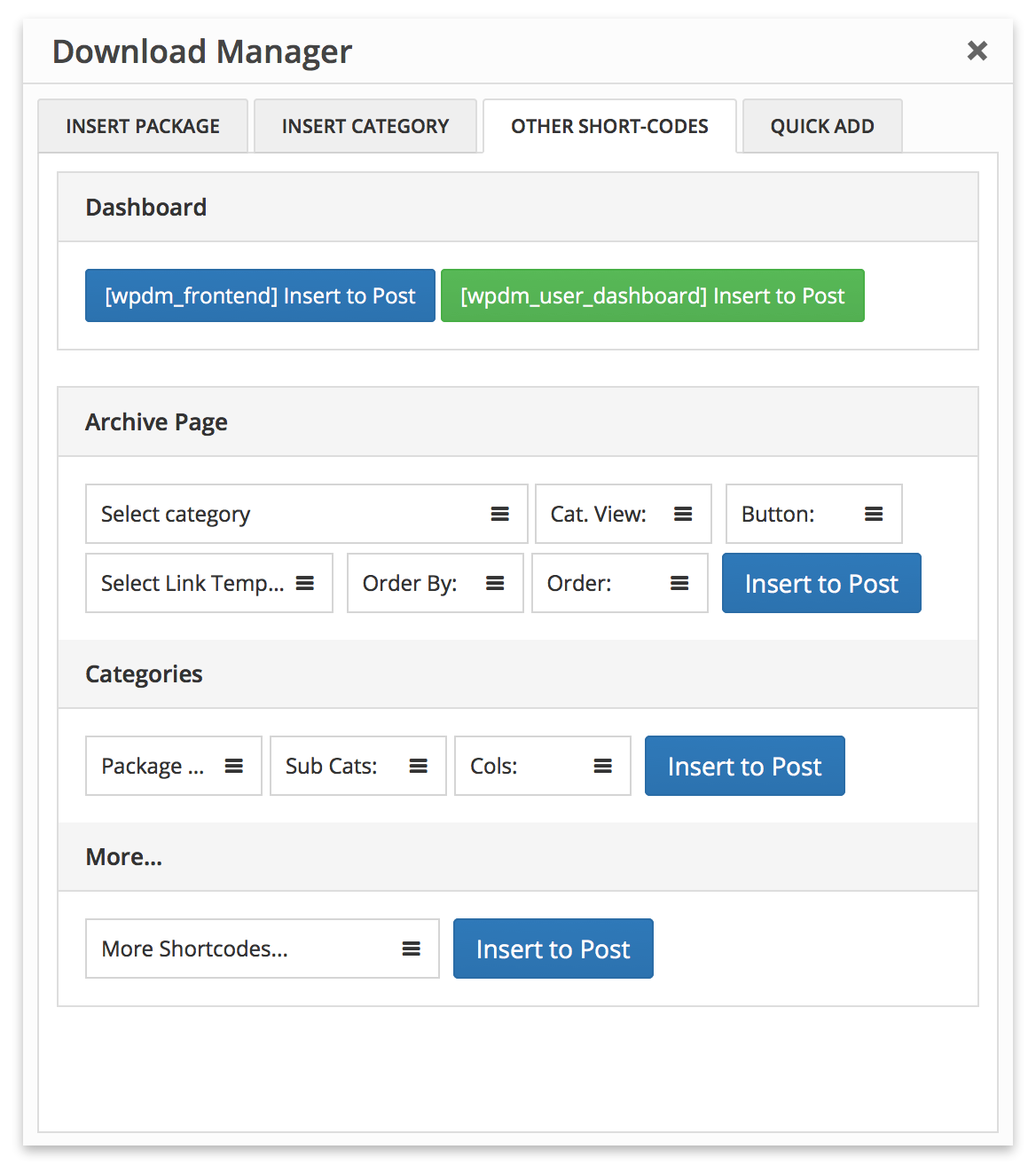
Please use WPDM Gutenberg Block Add-on or Advanced TinyMCE Button Add-on to generate short-codes properly, short-code options are marked in the following image:
Editing Template Files:
If you want to customize a view in your own way, you need to edit template files inside /plugins/wpdm-arhive-page/src/Templates/****/views/ dir. Please follow the following steps to edit a template file so that the new update doesn’t erase your changes:
- Create a dir path
download-manager/wpdm-arhive-page/****inside your active theme directory if it is already not there. Here replace****withsimpleorflatorfilterorcompact, depending on the template dir name, from where you are moving the template file. - For example, if you are editing template file from
/wpdm-archive-page/src/Templates/Filter/views, you need to place it in{active-theme-dir}/download-manager/wpdm-arhive-page/filter/ - Copy all the files you need to modify
- Update template file(s) in
{active-theme-dir}/download-manager/wpdm-arhive-page/****dir as per your need
WPDM Directory Add-on Demo:
WPDM Directory Add-on demo links:
- Archive Page Default
- Archive Page Flat
- Archive Page Compact
- Archive Page Simple
- Archive Page Green
- Categories
- Advanced Search
- Advanced Search ( Left )
- Advanced Search ( Right )
- Simple Search
The post WPDM Directory Add-on appeared first on WordPress Download Manager.





![[Refurb] Sony WH-1000XM5 Wireless Noise Cancelling Headphones (Black) -...](http://files.ozbargain.com.au/n/64/960764l.jpg?h=a44f0fb5)